Free campaign URL builder
How do I make a campaign URL for my venue?
Paste the page you want people to land on, pick where the link will be posted, and copy the tagged link below. This free UTM builder has presets for Instagram, The Knot, a wedding show, a flyer and your newsletter, and it draws a QR code of the link for print. No account.
UTM builder
Start from a venue preset
Your campaign URL
https://www.grandviewhall.com/weddings?utm_source=theknot&utm_medium=referral&utm_campaign=listing
- Google Analytics channel
- Referral
- Filed in MyVenueHQ as
- The Knot
QR code with UTM tags
The sample is a made-up venue, Grandview Hall. Nothing you type leaves this page.
The UTM parameters, and what each one is for
A campaign URL is your normal web address with a few tags after a question mark. Google Analytics, and MyVenueHQ, read the tags when someone opens the link. These are the parameters in Google’s URL builder help, with the values a venue would use.
| Parameter | What it records | Venue examples | When to set it |
|---|---|---|---|
utm_source | Where the link was posted | theknot, instagram, newsletter, flyer | Always |
utm_medium | The kind of channel | referral, social, email, print | Always |
utm_campaign | What you are promoting | listing, open-house-march, spring-show | Always |
utm_content | Which of two links in the same place | booth-card, banner, top-button | When one place has two links |
utm_term | The paid keyword | barn-wedding-venue | Only for search ads you tag by hand |
utm_id | A campaign ID from an ad platform | Your ad platform’s ID | Only if you upload cost data to Google Analytics |
How to tag your venue’s links
- List every place your link lives. The Instagram bio, the Facebook page, Google Business Profile, each directory listing, the email signature, the newsletter and anything printed each get their own link.
- Give each place one source name and keep it. Google’s help asks for one utm_source per platform. Pick theknot once and use it on every Knot link, every year.
- Pick the medium from Google’s channel words. Google Analytics sorts visits into channels by medium. Social goes to Organic Social, email to Email and referral to Referral. Use those words and each visit lands in the channel you expect.
- Name the campaign after what you are promoting.
listingfor an always-on directory link,open-house-marchfor one event,spring-showfor one wedding show. Add the year if you run the same thing again. - Use content when one place has two links. A booth card and a banner at the same show, or two buttons in one newsletter, which is Google’s own example.
- Point the link at the page that answers it. A wedding show crowd wants your wedding page or tour booking, and a corporate mailer wants your events page.
- Test it. Open the link in a private window, scan the QR code with your phone, and check the visit shows up under the right source.
Campaign URL examples for venues
These are the presets in the builder. The medium column follows Google Analytics’ default channel rules, and the sources match the names MyVenueHQ files inquiries under.
| Where the link goes | Source | Medium | Campaign | Google Analytics channel | MyVenueHQ files it as |
|---|---|---|---|---|---|
| Instagram bioThe link in your profile | instagram | social | bio-link | Organic Social | |
| Facebook postOne post or your page button | facebook | social | open-house-march | Organic Social | |
| The Knot listingThe website link on your listing | theknot | referral | listing | Referral | The Knot |
| WeddingWire listingThe website link on your listing | weddingwire | referral | listing | Referral | WeddingWire |
| Google Business ProfileThe website button on your profile | google_business | referral | profile | Referral | Google Business Profile |
| Email newsletterA link in one newsletter | newsletter | email | spring-dates | Email or newsletter | |
| Email signatureThe link under your name | email | email | signature | Email or newsletter | |
| Wedding showA QR code on your booth card | wedding-show | print | spring-showcontent: booth-card | Unassigned (Google has no print rule) | wedding-show |
| Flyer or table cardA QR code on paper | flyer | print | open-house-march | Unassigned (Google has no print rule) | Printed flyer |
A wedding show, start to finish
Say Grandview Hall takes a booth at a spring show. The booth card gets a QR code with source wedding-show, medium print, campaign spring-show and content booth-card. The banner behind the table gets the same tags with content banner. Both point at the tour booking page. After the show, Google Analytics lists the visits under wedding-show and print, and utm_content tells the card from the banner.
Directory listings work the same way. Wherever a listing lets you add your website, paste the tagged link instead of the bare address. A couple who clicks through then arrives tagged theknot or weddingwire, even if their browser hides where they came from.
QR codes for print
The QR code updates as you change the link. It is black on white with a white border four squares wide, and it uses the same encoder settings as the QR codes in the MyVenueHQ app.
- PNG for the print shop. It downloads at 1,024 pixels square on white.
- SVG for a designer. It stays sharp at any size, from a table card to a banner.
- One code per piece. If the card and the banner share a code, you cannot tell them apart later.
- Shorter links make simpler codes. Short tag values and a short page address give fewer squares, so each square prints larger at the same size.
Mistakes to avoid
| Mistake | What happens, and the fix |
|---|---|
| Mixing capitals | Google Analytics treats values as case sensitive, so Instagram and instagram become two rows. Its help says SpringSale and Spring_Sale are distinct too. The builder lowercases everything and turns spaces into dashes. |
| Two names for one place | ig, insta and instagram split one channel three ways. Google’s help asks for one utm_source per platform. Write your names down once and reuse them. |
| Leaving the campaign empty | Google’s help says to always set source, medium and campaign. A missing one shows as (not set) in reports. The builder will not make a link without all three. |
| Tagging links inside your own website | When a URL carries any UTM tag, Google Analytics takes the visit’s source from the tags alone. A tagged link from your home page to your weddings page names your own site as the source and hides where the couple came from. Tag only links that live somewhere else. |
| Pointing at the wrong page | Send each link to the page that answers it: the wedding page for a wedding show, the tour booking page for a booth card that offers tours. If you use MyVenueHQ, the tags must reach the page that holds your inquiry form or booking page. |
| Printing before you test | Scan the QR code from the proof at the size it will print, open the link, and send yourself a test inquiry. If the link goes through a shortener or a redirect, check the tags are still in the address when the page opens. |
| Putting names in the tags | Tags are visible in the address bar and in every report. Use the place and the promotion, and leave out couples’ names and emails. |
The internal link rule comes from Google’s article on how traffic source dimensions are updated.
See which links bring bookings
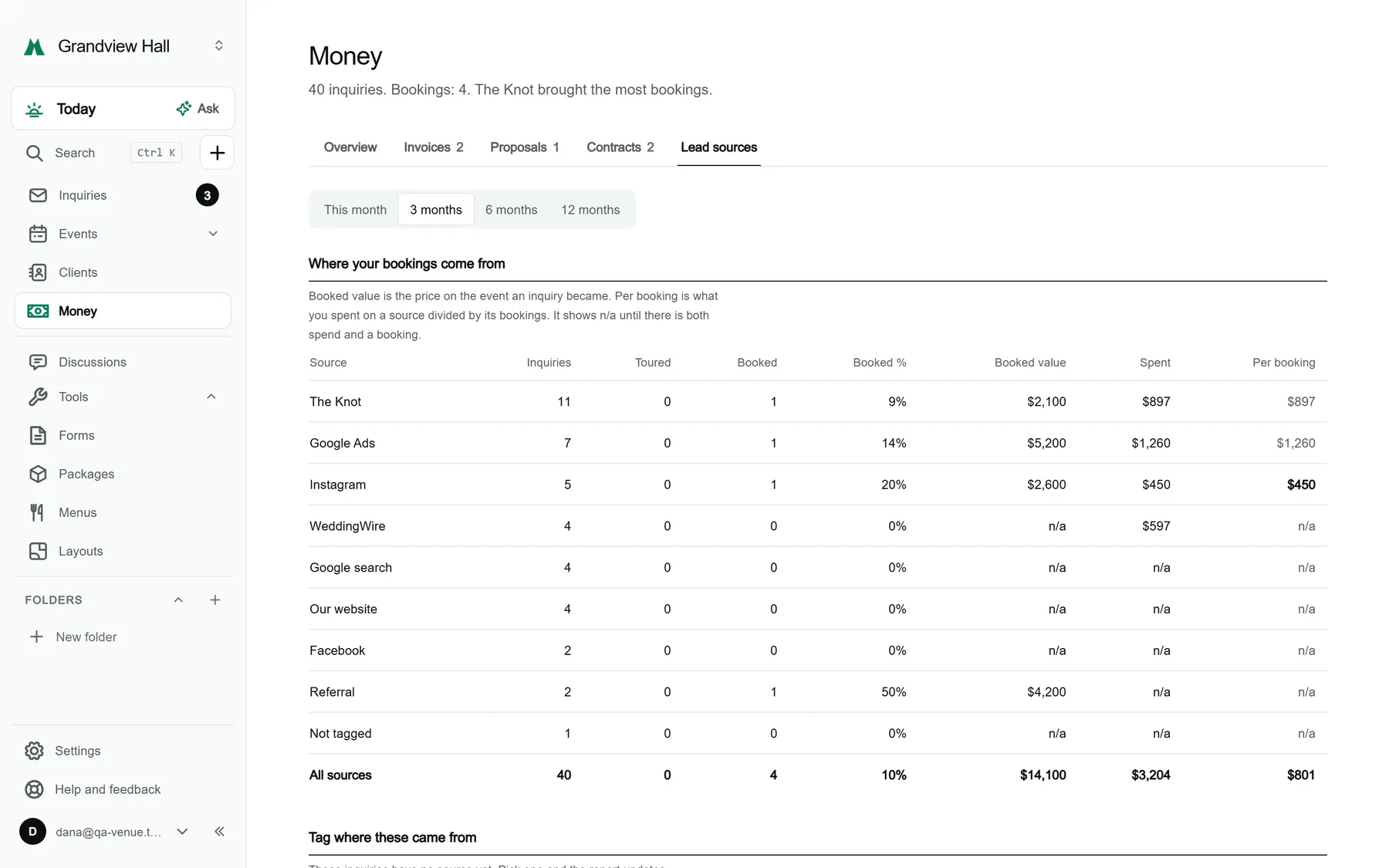
Google Analytics counts the visits a tagged link brings. Your bookings live somewhere else, so it does not know which visit became a signed wedding unless you send it that data. In a free MyVenueHQ account, every inquiry that arrives through a tagged link is filed under its source, and the Lead sources report shows what each source brought.
- Each inquiry is tagged for you. The source comes from utm_source. A source of google counts as Google Ads when the medium is cpc or paid, and Google search otherwise. A name outside the usual list, such as wedding-show, is kept as you typed it. You can change the source on any inquiry, and your choice is never overwritten.
- The report follows each source to the booking. For this month or the last 3, 6 or 12 months: inquiries, tours, bookings, booking rate and booked value per source. Type what you paid each source each month and it shows the cost per booking.
- The app makes the links too. Marketing, Links builds a tagged link to your booking page, inquiry form, tour booking page or open dates page (once you turn that page on), with a QR code as PNG or SVG.
- Your own website counts. The MyVenueHQ inquiry form and calendar embeds, with the line of code that comes with them, pass the tags of the page they sit on into the inquiry.
What it does not do, so you know before you sign up:
- It reads utm_source, utm_medium and utm_campaign. It does not read utm_content or utm_term, and the report groups by source, so a booth card and a banner with the same source share one row.
- It counts inquiries. For clicks and page views, use Google Analytics.
- The tags have to reach a page with your MyVenueHQ form, calendar or booking page. If a tagged link lands on your home page and the couple clicks through to a contact page, the tags are gone by the time they ask.
- A message a couple sends inside The Knot or WeddingWire never touches your link, so it is not tagged from it.
Lead sources works on the free plan, for owners and managers. The lead sources help article walks through the report, and venue marketing automation covers the rest of the marketing tools.

Campaign URL questions.
What is a campaign URL builder?
A campaign URL builder adds UTM tags to the end of a web address, such as ?utm_source=theknot&utm_medium=referral&utm_campaign=listing. When someone opens the link, your analytics reads the tags and records where the visit came from. The builder above does it for free, with presets for the places venues post links.
How is this different from Google’s campaign URL builder?
Both add the same UTM tags, and Google Analytics reads links from either one the same way. Google’s Campaign URL Builder lives on its GA Dev Tools site. This one adds presets for venue channels such as The Knot, a wedding show and a flyer, draws a QR code of the link, and shows where MyVenueHQ would file an inquiry from it.
Which UTM parameters do I need?
Source, medium and campaign, every time. Google’s help says to always use those three, and a missing one shows as (not set) in reports. Add content only when one place has two links, and term only for paid search keywords.
Are UTM parameters case sensitive?
Yes. Google Analytics counts utm_source=Instagram and utm_source=instagram as two different sources, and its help recommends lowercase as a standard practice. The builder lowercases every value for you.
What should I use as utm_medium for a flyer or a wedding show?
Use print for anything on paper, and tell the pieces apart with utm_content, such as booth-card and banner. Google Analytics has no default channel rule for print, so those visits show as Unassigned in the channel report and by name in the source and medium report.
Can I make a QR code with UTM tags?
Yes. The builder draws a QR code of the tagged link as you type. Download it as a PNG, 1,024 pixels square, for a print shop, or as an SVG for a designer. Scan the printed proof before you order the full run.
Should I add UTM tags to links on my own website?
No. When a URL carries UTM tags, Google Analytics takes the visit’s source from the tags alone, so a tagged link between your own pages replaces the real source with your own site. Tag only links you post somewhere else.
Is there a free UTM link generator that shows which links bring bookings?
Yes. In MyVenueHQ, an inquiry that comes in through a tagged link to your booking page, inquiry form or calendar is filed under its source, and the Lead sources report shows each source’s inquiries, tours, bookings and booked value. It works on the free plan. Google Analytics counts visits, and it does not see your bookings unless you send them to it.
Sources
- Google Analytics Help, URL builders: collect campaign data with custom URLs: the UTM parameters, always using source, medium and campaign, case sensitivity, lowercase as standard practice, one source per platform and (not set) for missing tags. Read November 25, 2026.
- Google Analytics Help, default channel group: the medium rules for Organic Social, Email and Referral, with no rule for print. Read November 25, 2026.
- Google Analytics Help, how traffic source dimensions are updated: with any UTM parameter on the URL, the source comes from the UTM parameters alone. Read November 25, 2026.
- Google’s Campaign URL Builder on GA Dev Tools. Opened November 25, 2026.